About
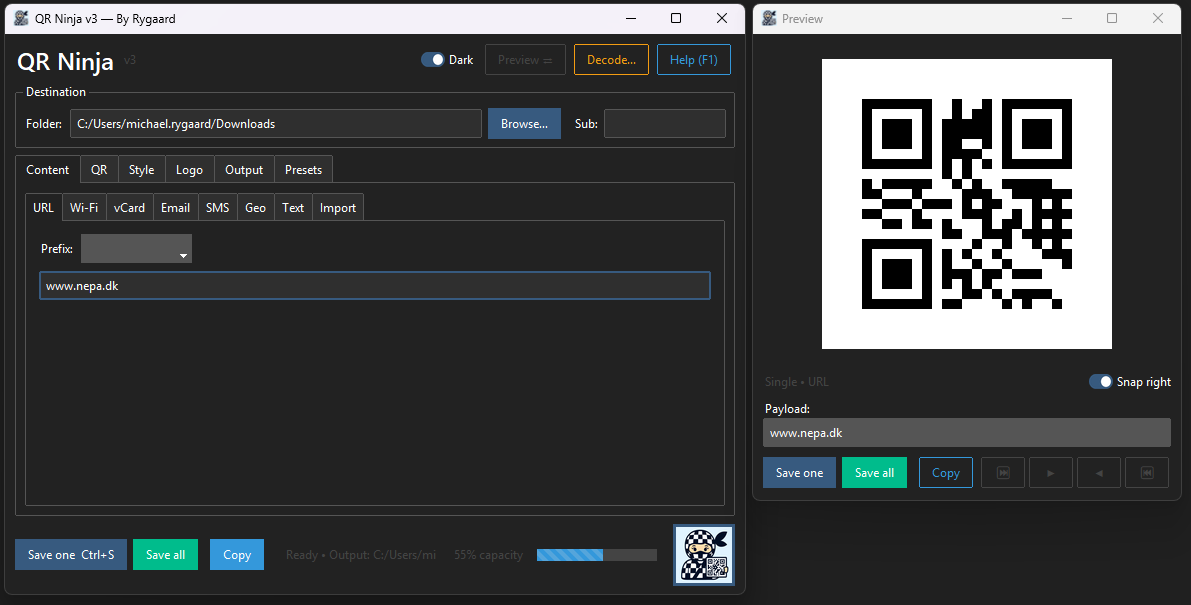
QR Ninja is a local Windows desktop application for generating QR codes. It handles plain URLs, Wi-Fi credentials, vCards, email links, SMS, and geo coordinates. A tabbed interface keeps content, style, logo, and output settings separate without hiding anything important.
Style options include six module shapes, solid or gradient color fills, and optional logo embedding with a padded rounded background. Batch mode reads a CSV or Excel file and writes one image per row. Presets let you save and reload any combination of settings. No internet connection required; nothing leaves your machine.
What it does
- Generate QR codes for URLs, Wi-Fi, vCard, email, SMS, and geo coordinates
- Choose from six module shapes and solid, radial, horizontal, or vertical gradient fills
- Embed a logo image centered on the QR code with an auto-sized white background
- Batch-process a CSV or Excel file to produce one QR image per row
- Save and restore named presets for any combination of style and output settings
- Export as PNG, JPEG, or SVG; optional drag-and-drop via tkinterdnd2
Requirements
Windows 10+, 64-bit. No Python installation required for the .exe — everything is bundled via PyInstaller.
Verify the download
Before running the executable, compare its SHA-256 hash to the one below.
703779f112db8ef505b822a17d0a967a161aff03a1604a000d91145aac679a8d
In PowerShell, from the folder where you saved the file:
Get-FileHash .\qrninja-v2.0.zip -Algorithm SHA256
If the output matches the hash above, the file is intact. If not, delete it and re-download.
Build it yourself
The source .zip contains everything needed to rebuild the executable from scratch:
qrninja.py— the full source.requirements.txt— pinned Python dependencies.build.bat— installs deps into a local venv and runs PyInstaller.README.md— build and usage notes.
With Python 3.12 installed, unzip and run:
build.bat Known limitations
Drag-and-drop and QR decode/verify require optional third-party packages (tkinterdnd2, pyzbar) installed separately.